




Buying guide
Choosing Accsoon equipment for your production
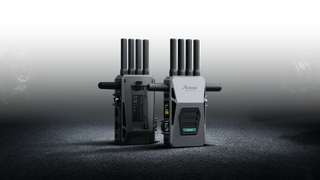
Match wireless video to your camera signal. CineView HE suits HDMI monitoring at up to 1080p60, while CineView SE adds SDI connections for HD workflows. CineView Master 4K supports UHD 4K60 through HDMI, but its 3G-SDI formats remain HD. Choose around the camera output and receiving display, rather than assuming every connector carries the headline resolution. The Master system’s stated range is up to 2.5 km line-of-sight; this is not a promise of equivalent performance through obstacles.
Decide whether your phone needs a wired or wireless feed. CineView Nano sends an HDMI camera feed wirelessly to up to four iOS or Android mobile devices, making it useful when several people need to watch. SeeMo adapters instead connect a camera to a mobile device by cable. SeeMo Pro accepts HDMI and SDI and captures up to 1080p60; separate SeeMo 4K models are offered for iPhone and Android. Match the adapter to your phone, connector and recording needs before choosing mounting accessories.
Separate display resolution from recording capability. The CineView M7 has a 1920 x 1080 touchscreen but can record up to 4K60 from HDMI, so accepting or recording 4K does not mean displaying it pixel-for-pixel. Its waveform and false colour tools help assess exposure, while LUT support lets you apply a chosen viewing look. M7H offers HDMI connectivity and Wi-Fi streaming; M7 Pro adds HDMI and SDI connections with integrated wireless transmission/reception. For transmitter operation on M7 Pro, confirm the required firmware and receiving destination.
Choose crew communication independently of video monitoring. CoMo intercoms carry crew conversations rather than camera pictures. Kits include one host and different numbers of remote headsets, with no external hub required. Noise-cancelling microphones and flip-up-to-mute operation suit crews coordinating positions while keeping hands available. Count the people who need to talk, then distinguish a complete kit from an individual host or remote headset.
Plan movement around the loaded rig. TopRig S60 provides 42.5 cm of motorised travel with onboard controls and Bluetooth app control. Its load limit changes from 4 kg horizontally to 2.5 kg vertically, making shooting orientation important when weighing the camera and accessories. Time-lapse camera control requires a separately sold control cable. The SR-01 support rods are an accessory for supporting this slider on a tripod, not another motion device.
Finish the setup with model-specific accessories. PowerCages provide tablet mounting and power options; they do not replace a video capture adapter. Likewise, the SeeMo Pro D-Tap cable and CineView V-mount adapter serve named devices rather than the whole range. Before ordering in Australia, confirm device fit, included cables, battery requirements and product terms with the store. For broader setup planning, read the beginner’s guide to choosing video equipment.
Frequently asked questions
Do I need a CineView transmitter, receiver or complete system?
A transmitter takes the camera signal and sends it wirelessly; a receiver supplies the feed to a connected display or other supported destination. CineView HE, SE and Master 4K are listed as complete systems and as separate units. For a new setup, distinguish the system listing from a single component, and confirm model compatibility before expanding an existing setup.
Can Accsoon CineView HE send video to a computer for streaming?
The CineView HE receiver includes a USB UVC output for sending its received signal to a computer for streaming with third-party applications. This is useful when the camera needs to remain away from the computer. Confirm the computer connection and application requirements; a USB power input on another device does not establish the same video-output capability.
Can CineView SE 4K output HDMI and SDI while transmitting 4K?
The CineView SE 4K system description states that the receiver’s SDI output is disabled when transmitting UHD 4K through HDMI. It also states that the receiver outputs progressive signals only. If your workflow needs an SDI feed alongside HDMI monitoring, establish the required signal format before choosing this system rather than relying on the presence of both sockets.
Which Accsoon PowerCage should I choose for my iPad?
PowerCage Mini is designed for iPad mini, while PowerCage Pro II lists 12.9-inch iPad Pro generations 3 to 6. PowerCage II covers a selection of iPad, iPad Air and smaller iPad Pro models. Match your exact model and generation to the product listing, not just the screen size, and confirm the power accessories included with that cage.
How many people can use an Accsoon CoMo intercom system?
A CoMo host supports up to eight remote headsets, allowing nine headset users in that configuration without an external hub. Supplied kits include one host with two, four, six or eight remotes. Individual remote headsets require a host, so choose the kit by total crew size and retain the host-and-remote distinction when adding headsets.